Volver a publicaciones

Automatización

Diun y alertas en Telegram: entérate de las imágenes nuevas sin actualizar a ciegas

7 min de lectura
#diun#docker#telegram#alertas#observabilidad

Portada: una caja de contenedor con una campana de aviso y un avión de papel sobre fondo oscuro con el título Diun y Telegram

Puntos clave

  • Diun avisa de imágenes nuevas pero no actualiza nada: tú decides cuándo.
  • Revisa cada día a una hora fija todos los contenedores, salvo los que excluyas.
  • Diun no avisa si una etiqueta fijada desaparece del registro: revísalas de vez en cuando.
  • Un único bot de Telegram sirve para Diun, CrowdSec y Uptime Kuma.
  • Token y chat id en ficheros .env con permisos 600, nunca en el repo.

Antes usaba Watchtower: vigilaba mis contenedores, los actualizaba solo y me avisaba después. Es cómodo, pero choca con una idea que para mí es básica: saber en todo momento qué versión corre cada servicio y poder volver atrás.

Ahora hago lo contrario: fijo las versiones en cada docker-compose.yml y actualizo a mano, con un commit. Para no quedarme atrás, uso Diun, que solo me avisa de que hay algo nuevo. Los avisos llegan a Telegram, por el mismo bot que usan el resto de mis servicios.

Qué vas a montar

  • Diun (Docker Image Update Notifier) en Docker, revisando tus contenedores una vez al día.
  • Un bot de Telegram propio y el id de tu chat.
  • Los avisos de Diun, CrowdSec y Uptime Kuma en ese mismo bot.
  • Una comprobación periódica de que las etiquetas fijadas siguen existiendo.

Requisitos

Paso 1: crear el bot de Telegram

  1. En Telegram, abre una conversación con @BotFather (el bot oficial para crear bots).
  2. Envía /newbot.
  3. Elige un nombre visible y un nombre de usuario que termine en bot.
  4. BotFather te devuelve un token. Es la contraseña del bot: guárdalo y no lo compartas.

Ahora necesitas el id de tu chat, que es a quién enviará el bot los mensajes. Abre una conversación con tu bot, envíale cualquier mensaje y ejecuta:

# Pega el token solo en esta variable temporal
read -rs TG_TOKEN
curl -s "https://api.telegram.org/bot${TG_TOKEN}/getUpdates"

read -rs pide el valor sin mostrarlo en pantalla ni guardarlo en el historial. En la respuesta JSON, busca "chat":{"id":...}: ese número es tu chat id.

Paso 2: los secretos, en un .env

Guarda el token y el chat id en un fichero compartido para tus propios scripts, fuera de cualquier repo:

# /volume1/docker/.notify.env — nunca en Git
TG_TOKEN=
TG_CHAT=
chmod 600 /volume1/docker/.notify.env

Y comprueba que funciona con un mensaje de prueba:

# Carga las variables sin escribir el token en el comando
set -a
. /volume1/docker/.notify.env
set +a

curl -s -X POST "https://api.telegram.org/bot${TG_TOKEN}/sendMessage" \
  --data-urlencode "chat_id=${TG_CHAT}" \
  --data-urlencode "text=Prueba desde el NAS: los avisos funcionan"

Si la respuesta empieza por {"ok":true, el mensaje ya está en tu móvil.

Paso 3: Diun en Docker

services:
  diun:
    image: crazymax/diun:4                 # etiqueta de versión mayor
    container_name: diun
    restart: unless-stopped
    env_file: .env                         # token y chat id de Telegram
    volumes:
      - ./data:/data                       # base de datos de imágenes vistas
      - /var/run/docker.sock:/var/run/docker.sock:ro
    environment:
      TZ: Europe/Madrid
      LOG_LEVEL: info
      DIUN_WATCH_SCHEDULE: "0 8 * * *"     # cada día a las 08:00
      DIUN_WATCH_FIRSTCHECKNOTIF: "false"  # no avisa en el primer escaneo
      DIUN_PROVIDERS_DOCKER: "true"
      DIUN_PROVIDERS_DOCKER_WATCHBYDEFAULT: "true" # vigila todos los contenedores
    security_opt:
      - no-new-privileges:true
    mem_limit: 64m
    labels:
      - diun.enable=false                  # no se vigila a sí mismo

Y su .env, con permisos 600:

DIUN_NOTIF_TELEGRAM_TOKEN=
DIUN_NOTIF_TELEGRAM_CHATIDS=

Cada ajuste tiene su motivo:

  • 0 8 * * *. Una vez al día, a una hora en la que lo voy a leer. Más a menudo solo genera ruido y peticiones al registro.
  • WATCHBYDEFAULT: true. Vigila todos los contenedores sin tener que etiquetarlos uno a uno. Para excluir alguno, ponle la etiqueta diun.enable=false, como hace Diun consigo mismo.
  • FIRSTCHECKNOTIF: false. En el primer escaneo lo ve todo por primera vez. Sin esto, recibirías un aviso por cada contenedor.
  • El socket en solo lectura (:ro) y 64 MB. Diun solo consulta; no necesita más.
docker compose up -d
docker exec diun diun notif test    # envía una notificación de prueba

Qué vigila exactamente

Por defecto, Diun comprueba si la imagen detrás de tu etiqueta ha cambiado en el registro. Por eso encaja bien con etiquetas de versión mayor, como crazymax/diun:4 o louislam/uptime-kuma:1: cuando sale una versión nueva dentro de esa rama, la etiqueta apunta a otra imagen y Diun avisa.

Si fijas una versión exacta, como :1.23.4, esa etiqueta no cambia nunca y Diun no dirá nada de la 1.23.5. Para eso tiene una opción: la etiqueta diun.watch_repo=true en el contenedor le hace revisar las etiquetas del repositorio, y diun.include_tags las filtra con una expresión regular.

El caso real: la etiqueta que desapareció

Fijar versiones es buena práctica, y aun así me dio un susto. Tenía Uptime Kuma fijado en una etiqueta antigua (:1.23). Un día tuve que recrear el contenedor y no pude: esa etiqueta ya no existía en el registro, así que Docker no pudo descargar la imagen.

Diun no me avisó, y es normal: Diun avisa de versiones nuevas, no de etiquetas que desaparecen. Por eso ahora compruebo de vez en cuando que las imágenes que uso siguen existiendo:

#!/usr/bin/env bash
# Comprueba que cada imagen en uso sigue disponible en su registro
set -uo pipefail
docker ps --format '{{.Image}}' | sort -u | while read -r image; do
  if docker manifest inspect "$image" > /dev/null 2>&1; then
    echo "OK     $image"
  else
    echo "FALTA  $image"
  fi
done

Las imágenes que construyes tú en local también saldrán como FALTA, porque no están en ningún registro: ignóralas. Otra forma sencilla es ejecutar docker compose pull en la carpeta de cada stack: si una etiqueta ya no existe, falla antes de que tengas que recrear nada.

Paso 4: un bot para todos

Uso el mismo bot para todo lo que tiene que avisarme. Los mensajes llegan al mismo chat, mezclados, y para mí es una ventaja: todo lo importante está en un sitio.

CrowdSec

CrowdSec envía sus avisos con su plugin HTTP. Este es un ejemplo del fichero de notificación (en mi caso, notifications/http.yaml):

type: http
name: telegram
log_level: info

# Agrupa avisos: sin esto, un escaneo con 50 IPs serían 50 mensajes
group_wait: 30s
group_threshold: 10

# El texto va en UNA línea con \n escapados: un salto de línea real rompe el JSON
format: |
  {"chat_id": "TU_CHAT_ID", "text": "CrowdSec:\n{{range .}}{{range .Decisions}}{{.Value}} bloqueada por {{.Scenario}} durante {{.Duration}}\n{{end}}{{end}}"}

url: https://api.telegram.org/botTU_TOKEN/sendMessage
method: POST
headers:
  Content-Type: application/json

Sustituye TU_TOKEN y TU_CHAT_ID por tus valores, activa la notificación telegram en el perfil de CrowdSec y protege el fichero con chmod 600: aquí el token está en claro.

Dos cosas que aprendí aquí: la agrupación (group_wait y group_threshold) evita que un escaneo te llene el móvil de mensajes, y el text debe ir en una sola línea con \n escapados. Con un salto de línea real dentro de la cadena, el JSON deja de ser válido y Telegram responde con un error 400.

Uptime Kuma

En Uptime Kuma, en los ajustes de notificaciones, añade una de tipo Telegram con el mismo token y chat id. Márcala para que se aplique por defecto a los monitores nuevos y usa el botón de prueba. Es lo que me habría avisado del contenedor que estuvo semanas parado sin que nadie se enterara.

Problemas frecuentes

Síntoma Causa probable Solución
getUpdates devuelve una lista vacía No has escrito al bot Envíale un mensaje y repite
Telegram responde 401 Token incorrecto Cópialo de nuevo desde BotFather
Telegram responde 400 JSON inválido o chat id erróneo Texto en una línea con \n; revisa el id
Una avalancha de avisos al arrancar Diun Primer escaneo con avisos DIUN_WATCH_FIRSTCHECKNOTIF: "false"
Diun no avisa de una versión nueva Etiqueta exacta que no cambia Etiqueta de versión mayor o diun.watch_repo=true
No se puede recrear un contenedor La etiqueta fijada ya no existe Revisa las etiquetas con el script de arriba

Conclusión

Diun me da lo mejor de los dos mundos: sé cuándo hay algo nuevo, pero ninguna actualización ocurre sin que yo lo decida. La lección de la etiqueta perdida es sencilla: fijar versiones no es “configurar y olvidar”; hay que revisarlas.

Con un único bot de Telegram, todos los avisos del homelab llegan a un solo sitio. Y si quieres ver el estado de tus servicios además de recibir avisos, en el capítulo de Uptime Kuma de la serie “Mi NAS paso a paso” explico cómo publicarlo incluso en tu CV.

I used to run Watchtower: it watched my containers, updated them on its own and told me afterwards. It is convenient, but it clashes with an idea that is basic for me: knowing at all times which version each service runs and being able to roll back.

Now I do the opposite: I pin versions in each docker-compose.yml and update by hand, with a commit. To avoid falling behind, I use Diun, which only tells me that something new is out. The alerts arrive on Telegram, through the same bot the rest of my services use.

What you will build

  • Diun (Docker Image Update Notifier) in Docker, checking your containers once a day.
  • Your own Telegram bot and your chat id.
  • Alerts from Diun, CrowdSec and Uptime Kuma on that same bot.
  • A periodic check that your pinned tags still exist.

Requirements

Step 1: create the Telegram bot

  1. In Telegram, open a chat with @BotFather (the official bot for creating bots).
  2. Send /newbot.
  3. Choose a display name and a username ending in bot.
  4. BotFather gives you a token. It is the bot’s password: keep it and do not share it.

Now you need your chat id, which is who the bot will send messages to. Open a chat with your bot, send it any message and run:

# Paste the token only into this temporary variable
read -rs TG_TOKEN
curl -s "https://api.telegram.org/bot${TG_TOKEN}/getUpdates"

read -rs asks for the value without showing it on screen or saving it in the history. In the JSON response, look for "chat":{"id":...}: that number is your chat id.

Step 2: secrets in a .env

Store the token and chat id in a shared file for your own scripts, outside any repo:

# /volume1/docker/.notify.env — never in Git
TG_TOKEN=
TG_CHAT=
chmod 600 /volume1/docker/.notify.env

And check that it works with a test message:

# Load the variables without typing the token in the command
set -a
. /volume1/docker/.notify.env
set +a

curl -s -X POST "https://api.telegram.org/bot${TG_TOKEN}/sendMessage" \
  --data-urlencode "chat_id=${TG_CHAT}" \
  --data-urlencode "text=Test from the NAS: alerts are working"

If the response starts with {"ok":true, the message is already on your phone.

Step 3: Diun in Docker

services:
  diun:
    image: crazymax/diun:4                 # major version tag
    container_name: diun
    restart: unless-stopped
    env_file: .env                         # Telegram token and chat id
    volumes:
      - ./data:/data                       # database of images already seen
      - /var/run/docker.sock:/var/run/docker.sock:ro
    environment:
      TZ: Europe/Madrid
      LOG_LEVEL: info
      DIUN_WATCH_SCHEDULE: "0 8 * * *"     # every day at 08:00
      DIUN_WATCH_FIRSTCHECKNOTIF: "false"  # no alerts on the first scan
      DIUN_PROVIDERS_DOCKER: "true"
      DIUN_PROVIDERS_DOCKER_WATCHBYDEFAULT: "true" # watch every container
    security_opt:
      - no-new-privileges:true
    mem_limit: 64m
    labels:
      - diun.enable=false                  # does not watch itself

And its .env, with 600 permissions:

DIUN_NOTIF_TELEGRAM_TOKEN=
DIUN_NOTIF_TELEGRAM_CHATIDS=

Each setting has a reason:

  • 0 8 * * *. Once a day, at a time when I will read it. More often only creates noise and requests to the registry.
  • WATCHBYDEFAULT: true. It watches every container without having to label them one by one. To exclude one, give it the diun.enable=false label, as Diun does with itself.
  • FIRSTCHECKNOTIF: false. On the first scan it sees everything for the first time. Without this, you would get one alert per container.
  • The socket read-only (:ro) and 64 MB. Diun only queries; it needs nothing more.
docker compose up -d
docker exec diun diun notif test    # sends a test notification

What exactly it watches

By default, Diun checks whether the image behind your tag has changed in the registry. That is why it fits well with major version tags, such as crazymax/diun:4 or louislam/uptime-kuma:1: when a new version comes out within that branch, the tag points to another image and Diun alerts you.

If you pin an exact version, such as :1.23.4, that tag never changes and Diun will say nothing about 1.23.5. There is an option for that: the diun.watch_repo=true label on the container makes it check the repository’s tags, and diun.include_tags filters them with a regular expression.

The real case: the tag that disappeared

Pinning versions is good practice, and it still gave me a scare. I had Uptime Kuma pinned to an old tag (:1.23). One day I had to recreate the container and could not: that tag no longer existed in the registry, so Docker could not download the image.

Diun did not warn me, and that is expected: Diun reports new versions, not tags that disappear. That is why I now check every so often that the images I use still exist:

#!/usr/bin/env bash
# Checks that every image in use is still available in its registry
set -uo pipefail
docker ps --format '{{.Image}}' | sort -u | while read -r image; do
  if docker manifest inspect "$image" > /dev/null 2>&1; then
    echo "OK       $image"
  else
    echo "MISSING  $image"
  fi
done

Images you build locally will also show up as MISSING, because they are not in any registry: ignore them. Another simple way is to run docker compose pull in each stack’s folder: if a tag no longer exists, it fails before you need to recreate anything.

Step 4: one bot for everything

I use the same bot for everything that needs to alert me. The messages arrive in the same chat, mixed together, and for me that is an advantage: everything important is in one place.

CrowdSec

CrowdSec sends its alerts with its HTTP plugin. This is an example of the notification file (in my case, notifications/http.yaml):

type: http
name: telegram
log_level: info

# Group alerts: without this, a scan from 50 IPs would be 50 messages
group_wait: 30s
group_threshold: 10

# The text goes on ONE line with escaped \n: a real line break breaks the JSON
format: |
  {"chat_id": "YOUR_CHAT_ID", "text": "CrowdSec:\n{{range .}}{{range .Decisions}}{{.Value}} blocked by {{.Scenario}} for {{.Duration}}\n{{end}}{{end}}"}

url: https://api.telegram.org/botYOUR_TOKEN/sendMessage
method: POST
headers:
  Content-Type: application/json

Replace YOUR_TOKEN and YOUR_CHAT_ID with your values, enable the telegram notification in the CrowdSec profile and protect the file with chmod 600: the token is in plain text here.

Two things I learned here: grouping (group_wait and group_threshold) stops a scan from flooding your phone with messages, and the text must be on a single line with escaped \n. With a real line break inside the string, the JSON is no longer valid and Telegram answers with a 400 error.

Uptime Kuma

In Uptime Kuma, in the notification settings, add a Telegram one with the same token and chat id. Mark it to apply by default to new monitors and use the test button. That is what would have warned me about the container that was down for weeks without anyone noticing.

Common problems

Symptom Likely cause Fix
getUpdates returns an empty list You have not messaged the bot Send it a message and try again
Telegram answers 401 Wrong token Copy it again from BotFather
Telegram answers 400 Invalid JSON or wrong chat id Text on one line with \n; check the id
A flood of alerts when Diun starts First scan with alerts DIUN_WATCH_FIRSTCHECKNOTIF: "false"
Diun does not report a new version Exact tag that never changes Major version tag or diun.watch_repo=true
A container cannot be recreated The pinned tag no longer exists Check your tags with the script above

Conclusion

Diun gives me the best of both worlds: I know when something new is out, but no update happens without my decision. The lesson of the lost tag is simple: pinning versions is not “set and forget”; you have to review them.

With a single Telegram bot, every homelab alert lands in one place. And if you want to see the status of your services as well as get alerts, in the Uptime Kuma chapter of the “Mi NAS paso a paso” series I explain how to publish it, even on your CV.

Preguntas frecuentes

¿Por qué Diun y no Watchtower?

Watchtower actualiza los contenedores solo. Yo fijo versiones y actualizo a mano con un commit, así sé qué cambió y puedo volver atrás. Diun solo me avisa.

¿Es seguro montar el socket de Docker en Diun?

El socket da mucho poder, así que lo monto en solo lectura y limito el contenedor. Diun solo necesita consultar qué contenedores e imágenes hay.

¿Puedo usar un bot distinto para cada servicio?

Sí. Yo uso uno para todo y los avisos llegan mezclados al mismo chat. Si quieres separarlos, crea otro bot con BotFather y cambia el token en ese servicio.

Fuentes
Proyecto relacionado

Infraestructura Pesoz

Homelab self-hosted en producción 24/7: un NAS Synology con ~30 servicios en Docker tras Caddy + CrowdSec y un portátil con GPU como servidor de IA y observabilidad en k3s. VPN WireGuard, GitOps con Forgejo y estado en vivo con Uptime Kuma.
Compartir:LinkedInX
ivanjonasfc@dev: ~ — zshsesión en vivo

❯ neofetch

Perfilivanjonasfc@dev

Iván Jonás Fernández Correa
user
ivanjonasfc@dev
role
Full-Stack & DevOps
loc
Gijón, Asturias
títulos
DAM + ASIR
stack
Java · Python · TS · Docker · Linux · IA
busco
Full-Stack · DevOps · Sistemas
status
Disponible para trabajar

❯ uptime --human

Años en tecnología
6+
Proyectos en producción
6
Proyectos entregados
10+
Servicios self-hosted
~30

❯ figlet "Iván Jonás"

# Hola, soyIván Jonás

Desarrollador Full-Stack & DevOpsFull-Stack Developer & DevOps

Desarrollador Full-Stack & DevOps · Gijón, Asturias · ● Disponible para trabajar

↓ desliza, toca o escribe para abrir la sesión

❯ cat about.md

Desarrollo aplicaciones web y móviles de principio a fin (Java/Spring Boot, Python/FastAPI, TypeScript/React y Flutter) y me ocupo de su puesta en producción y operación con Docker, Linux, CI/CD y monitorización. Actualmente administro la infraestructura IT de una pyme y mantengo un homelab de unos 30 servicios en el que evalúo nuevas tecnologías, incluida IA local y privada (Ollama, RAG, MCP). Técnico Superior en DAM y ASIR.

❯ ls ~

Iván en números

Mi actividad en GitHub, mi trayectoria y mi infraestructura · datos en vivo.

Community

0

followers

followerfollowerfollowerfollowerfollower+8

Lenguajes

TypeScript32%
Dart14%
Python12%
HTML7%
SCSS5%

Tech Stack

Frontend

React
Next.js
Angular
Astro
Ionic
Flutter
TypeScript
Tailwind
shadcn/ui
React
Next.js
Angular
Astro
Ionic
Flutter
TypeScript
Tailwind
shadcn/ui

Backend

NestJS
FastAPI
Spring Boot
Python
Java
PostgreSQL
Redis
Qdrant
pgvector
MCP
RAG
LLMs
NestJS
FastAPI
Spring Boot
Python
Java
PostgreSQL
Redis
Qdrant
pgvector
MCP
RAG
LLMs

Tools

Docker
Linux
Nginx
Cloudflare
Forgejo
n8n
WireGuard
Prometheus
Grafana
Git
Windows Server
Active Directory
Loki
Tempo
Docker
Linux
Nginx
Cloudflare
Forgejo
n8n
WireGuard
Prometheus
Grafana
Git
Windows Server
Active Directory
Loki
Tempo

Proyectos Destacados

Soluciones reales a problemas reales. Una selección de mis trabajos más recientes.

Web Rutas Raíces
Cliente real

Web Rutas Raíces

Web de senderismo para cliente real en Asturias. Astro 7 + React 19 + Tailwind 4, mapas Leaflet con perfil de elevación a partir de GPX y versión bilingüe ES/EN. Alta de rutas automatizada con n8n + IA; WebP, CSP y cumplimiento RGPD.

AstroReactLeafletn8n
Infraestructura IT para una pyme
Cliente real

Infraestructura IT para una pyme

Diseño, implantación y soporte continuo de la infraestructura IT de una pequeña empresa que trabajaba desde un único portátil: NAS en RAID 1 con Btrfs y snapshots, permisos por grupos sobre SMB, puestos Windows 11 y una capa Docker para gestión documental, automatización y monitorización.

NASRAID 1BtrfsWindows 11DockerPaperless-ngx
OposApp
TFG

OposApp

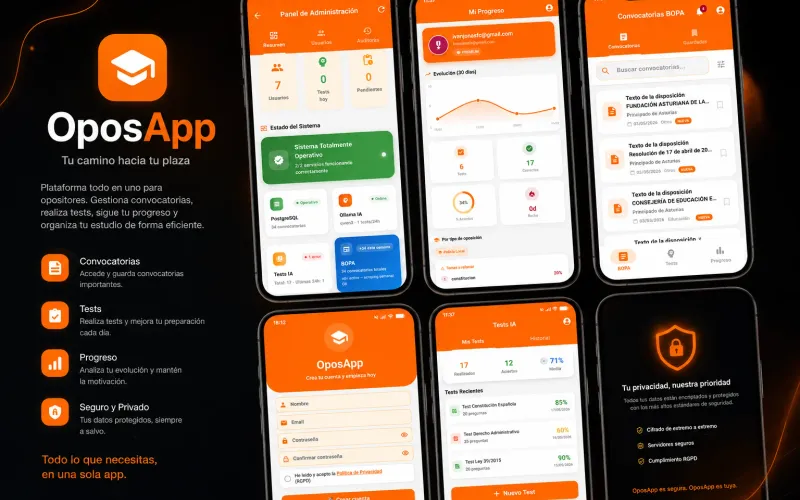
Mi Trabajo de Fin de Grado (DAM): app móvil en Flutter que automatiza el seguimiento de convocatorias del BOPA y genera tests de práctica con IA local (Ollama), con privacidad total por diseño.

FlutterSpring BootIA Local (Ollama)PostgreSQLRGPD
English Brain — Tu coach de entrevistas en inglés con IA, autoalojado
Open Source · Activo

English Brain — Tu coach de entrevistas en inglés con IA, autoalojado

Una plataforma privada y autoalojada para preparar entrevistas técnicas en inglés hablando, no escribiendo. Tocas un orbe, hablas, y el coach te transcribe, te corrige la pronunciación fonema a fonema y te programa el repaso con repetición espaciada (py-fsrs). Toda la IA —el modelo de lenguaje, el reconocimiento de voz y la síntesis— corre en tu propio hardware: tu voz y tus respuestas nunca salen de tu red. Por dentro: cliente Flutter (Android, Web y Windows), orquestador FastAPI y una arquitectura GPU híbrida sobre Docker + Caddy.

IA localVozFlutterFastAPISelf-hostedPronunciación
QuantumSec — Kompliance
FCT 2025

QuantumSec — Kompliance

Prácticas FCT en remoto en una empresa de ciberseguridad (plataforma de cumplimiento Kompliance). Llevé su gestor de auditorías de Supabase a una API propia self-hosted con FastAPI: multitenancy validado por JWT, secretos cifrados, logs de auditoría inmutables y un gestor de contraseñas con claves de un solo uso cifradas.

FastAPIReactTypeScriptPostgreSQLSeguridad
DozeForge — Control total de tu Android por ADB (sin root)
Open Source · Beta 1

DozeForge — Control total de tu Android por ADB (sin root)

App de escritorio que te da el control real de tu Android desde el PC, sin rootear. La conectas por ADB y optimizas batería, memoria, red y decenas de ajustes del sistema desde un solo sitio: caza las apps que te drenan la batería (aunque se escondan tras Google Play Services), quita bloatware de fábrica y aplica perfiles de un clic — y todo es reversible con rollback atómico. Por dentro: Tauri 2 + Rust + SvelteKit 5, telemetría real (dumpsys/sysfs) y primitivas públicas de Android.

Android sin rootOptimizaciónTauri 2RustSvelteKit
SubsForge — Subtítulos con IA, 100% en local
Open Source

SubsForge — Subtítulos con IA, 100% en local

App de escritorio para traducir, generar, sincronizar, fusionar, limpiar, doblar, resumir e incrustar subtítulos de vídeo con IA — sin servicios de terceros y funcionando 100% en tu máquina. Nueve herramientas en una: traducción por lotes (nube u Ollama local), transcripción con Whisper, sincronización por detección de voz (VAD), doblaje con voces TTS, hardsub y limpieza de audio. Por dentro: Tauri 2 + Rust como puente y un sidecar de Python (faster-whisper, FFmpeg, ffsubsync, edge-tts) que hace el trabajo pesado sin bloquear nunca la interfaz.

Subtítulos IAWhisperTauri 2RustPython100% local
OrquestaGit — Tu DevOps senior local con IA
Open Source · En desarrollo

OrquestaGit — Tu DevOps senior local con IA

Una app de escritorio que automatiza el trabajo repetitivo de DevOps sobre tus repositorios: escanea su estado, bloquea secretos antes de cada commit, genera pipelines de CI/CD y audita dependencias, todo desde un único panel de control. La IA corre en local con Ollama, así que tu código nunca sale de tu equipo. Construida con Tauri 2 y un motor de orquestación en Python.

DevOpsIA localSeguridadTauri 2PythonCI/CD
Job-radar · Empleo CRM
Open Source

Job-radar · Empleo CRM

CRM web self-hosted que automatiza y centraliza mi búsqueda de empleo: reúne las ofertas, las puntúa con IA (Groq/Gemini/Ollama), genera carta y ajustes de CV, y las sigue en un kanban. Astro SSR + React + PostgreSQL, todo configurable desde la web y replicable con un comando.

Astro SSRReactPostgreSQLIA · LLMsn8nDocker
LifeOS — Suite familiar con IA
En desarrollo

LifeOS — Suite familiar con IA

Suite SaaS familiar autohospedada con IA propia ("Lito"). Backend NestJS + PostgreSQL + BullMQ y app Angular 18 + Ionic. RAG sobre pgvector/Qdrant y LLMs vía Model Context Protocol (MCP). Módulos de chat, gastos con splits en tiempo real, calendario, nube y notas.

NestJSAngularIA / RAGMCPDocker
Infraestructura Pesoz
En Producción

Infraestructura Pesoz

Homelab self-hosted en producción 24/7: un NAS Synology con ~30 servicios en Docker tras Caddy + CrowdSec y un portátil con GPU como servidor de IA y observabilidad en k3s. VPN WireGuard, GitOps con Forgejo y estado en vivo con Uptime Kuma.
Dockerk3sCaddyWireGuardCI/CDObservabilidad
Hooklab
Nuevo

Hooklab

Constructor, firmador y verificador de webhooks 100% en el navegador: crea payloads con variables simuladas, firma y verifica HMAC (GitHub, Stripe, Shopify, Slack), genera con IA local y dispara un POST. Zero-backend, con el estado compartible en la URL.

AstroZero-backendWeb CryptoIA local
Acopio de Código
Nuevo

Acopio de Código

Página web interactiva con snippets de código de varios lenguajes: busca, copia y ten todo a mano. Autohospedada en mi propia infraestructura.

ReactSnippetsSelf-hosted
Vagabond Battery Saver
Open Source

Vagabond Battery Saver

Módulo Magisk para Android root. Optimización agresiva de batería mediante gestión de governors de CPU y perfiles de energía al bloquear la pantalla.

AndroidShell ScriptMagisk
Happines&CO
Educativo

Happines&CO

Sitio web corporativo para empresa de eventos, desarrollado durante el ciclo de DAM. Diseño responsive y estructura semántica limpia.

HTML5CSS3JavaScript
Portfolio Web
Meta

Portfolio Web

Este mismo sitio. Astro 7 + React (islas) + Tailwind, self-hosted con Docker y Caddy. Cada proyecto es una carpeta con su contenido y se da de alta con un script (npm run proyecto:add).

AstroReactTailwindSelf-hosted

Últimas publicaciones

Guías prácticas probadas en mi propia infraestructura.

Portada: escudo con símbolo de prohibido sobre fondo oscuro con el título AdGuard Home
Redes y seguridad

AdGuard Home en Docker: sin publicidad en toda la casa y tus subdominios en local

Monto AdGuard Home en Docker para bloquear publicidad en toda la red, usar DNS cifrado y resolver mis subdominios en casa sin depender del router.

8 min de lectura

#adguard-home#dns#docker#privacidad#homelab
Leer
Portada: candado con flechas de entrada sobre fondo oscuro con el título Caddy como puerta de entrada
Redes y seguridad

Caddy como puerta de entrada del homelab: HTTPS, cabeceras seguras y CrowdSec

Cómo uso Caddy en Docker como única entrada a mi NAS: HTTPS por DNS de Cloudflare, snippets de seguridad, paneles solo LAN y CrowdSec contra IPs abusivas.

11 min de lectura

#caddy#https#docker#crowdsec#seguridad#cloudflare
Leer
Portada: una caja de contenedor con una campana de aviso y un avión de papel sobre fondo oscuro con el título Diun y Telegram
Automatización

Diun y alertas en Telegram: entérate de las imágenes nuevas sin actualizar a ciegas

Uso Diun para saber cuándo hay imágenes Docker nuevas y un único bot de Telegram para recibir los avisos de Diun, CrowdSec y Uptime Kuma.
7 min de lectura

#diun#docker#telegram#alertas#observabilidad
Leer
Portada: ramas de Git que se unen en una marca de verificación sobre fondo oscuro con el título Forgejo y GitHub Actions
Automatización

Forgejo y GitHub Actions: tu infraestructura en Git y un repo público profesional

Monto Forgejo en casa como fuente de verdad de mi infraestructura, protejo los secretos y preparo un repo público con CI, Dependabot y plantillas.

13 min de lectura

#git#forgejo#github-actions#ci#gitops#buenas-practicas
Leer
Portada: logotipo de reproducción sobre fondo oscuro con el título Jellyfin en mi NAS
Homelab

Jellyfin en un NAS: Docker, transcoding por hardware y la TV que no quería conectar

Cómo monto Jellyfin en un NAS con Intel, activo el transcoding por GPU, lo publico con Caddy y arreglo el error -27 de las TV LG antiguas.

7 min de lectura

#jellyfin#docker#nas#caddy#transcoding#synology
Leer
Portada: gráfica de líneas y barras de un panel de métricas sobre fondo oscuro con el título Observabilidad en casa
Homelab

Observabilidad en casa: Grafana, Prometheus y Loki sin ahogar el NAS

Monto métricas, logs y alertas con Prometheus, Grafana y Loki, y cuento por qué acabé moviendo el stack del NAS a un portátil con k3s.

11 min de lectura

#grafana#prometheus#loki#observabilidad#docker#kubernetes
Leer
Portada: línea de latido y barras de disponibilidad sobre fondo oscuro con el título Uptime Kuma
Homelab

Uptime Kuma: vigila tus servicios y enseña su estado en vivo en tu CV

Monto Uptime Kuma en Docker, configuro monitores y avisos útiles, publico solo la página de estado y la muestro en mi portfolio con un widget en JS.

8 min de lectura

#uptime-kuma#monitorizacion#docker#caddy#portfolio
Leer

Trabajemos juntos

¿Buscas un perfil full-stack / DevOps, un colaborador o un freelance? Cuéntame qué necesitas y te respondo en menos de 24 h.

ivanjonasfc@dev:~/contacto

# ¿Qué te trae por aquí?

↳
↳
↳

Sin spam. Tus datos solo se usan para responderte.

Terminal interactiva